
How to deploy a Sapper PWA on GitHub Page
Here is a quick and easy tutorial on how to deploy a PWA made with SvelteKit/Sapper & Svelte on GitHub Pages.
- Configure your project's GitHub repository (in the repository
/settings) to use the GitHub Pages functionality and choose to publish the content of thegh-pagesbranch.
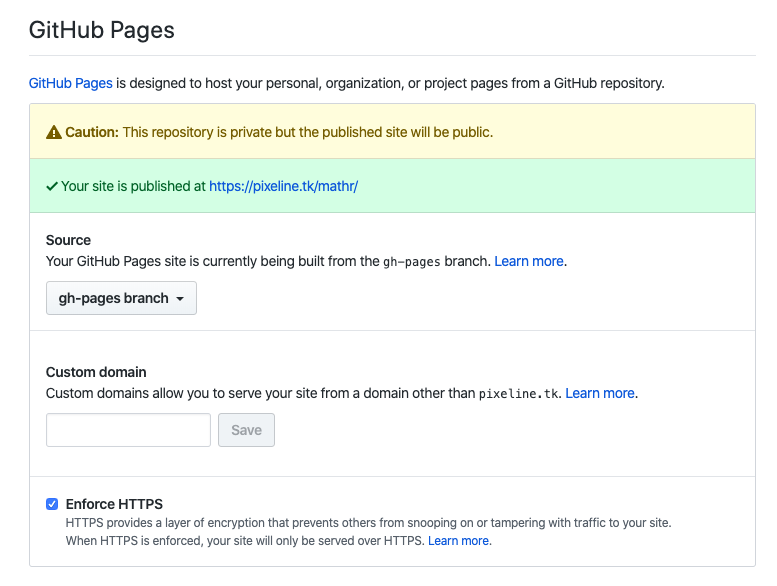
Pay extra attention to your repository slug name: it will become the foldername value to use later. In this example, it is "mathr", a personal project of mine (math quizz game for my bored teenage girl 🤓 )
1. Build your SPA
... until the point of readiness (obviously ;-) )
2. Export the code and check if it is good to go
npx sapper export
npx serve __sapper__/export
4. Serving from a subfolder
That's the tricky part. Since as a GitHub Pages, your project will most probably be served in a subfolder (unless you use your own domain name), modify the file src/server.js, to mention your subfolder. It will be used as the base tag href attribute value:
<base href="/yourproject">
polka()
    .use(
        'yourproject', // <-- replace yourproject with your repo name
        compression({ threshold: 0 }),
        sirv('static', { dev }),
        sapper.middleware()
    )
    .listen(PORT, err => {
        if (err) console.log('error', err);
    });
5. Deploy via the Terminal
We want to be able to deploy using a simple command:
npm run deploy
To achieve that, install this npm package: gh-pages - npm
npm install gh-pages --save-dev
Then, in the root of your project folder, create the file /scripts/gh-pages.js with this content:
var ghpages = require('gh-pages');

ghpages.publish(
    '__sapper__/export/yourproject',// <-- replace yourproject with your repo name
    {
        branch: 'gh-pages',
        repo: 'https://github.com/username/yourproject.git',
        user: {
            name: 'Your name',
            email: 'Your Email address'
        }
    },
    () => {
        console.log('Deploy Complete!')
    }
)
Finally, update your package.json project file with the following (again, replace yourproject with your repo name):
"scripts": {
...
    "export": "sapper export --basepath yourproject --legacy",
...
    "deploy": "npm run export && node ./scripts/gh-pages.js"
  },
````

## 6. Finally, test it out !

From inside your project folder, launch this command:


```bash
npm run deploy
Following these steps worked for me 🚀. Do let me know if you run into hiccups ;-)